 English
 简体中文
简体中文
 繁體中文
繁體中文
 Français
 Español
 عربي ،
 русский язык
 Português
 Deutsch


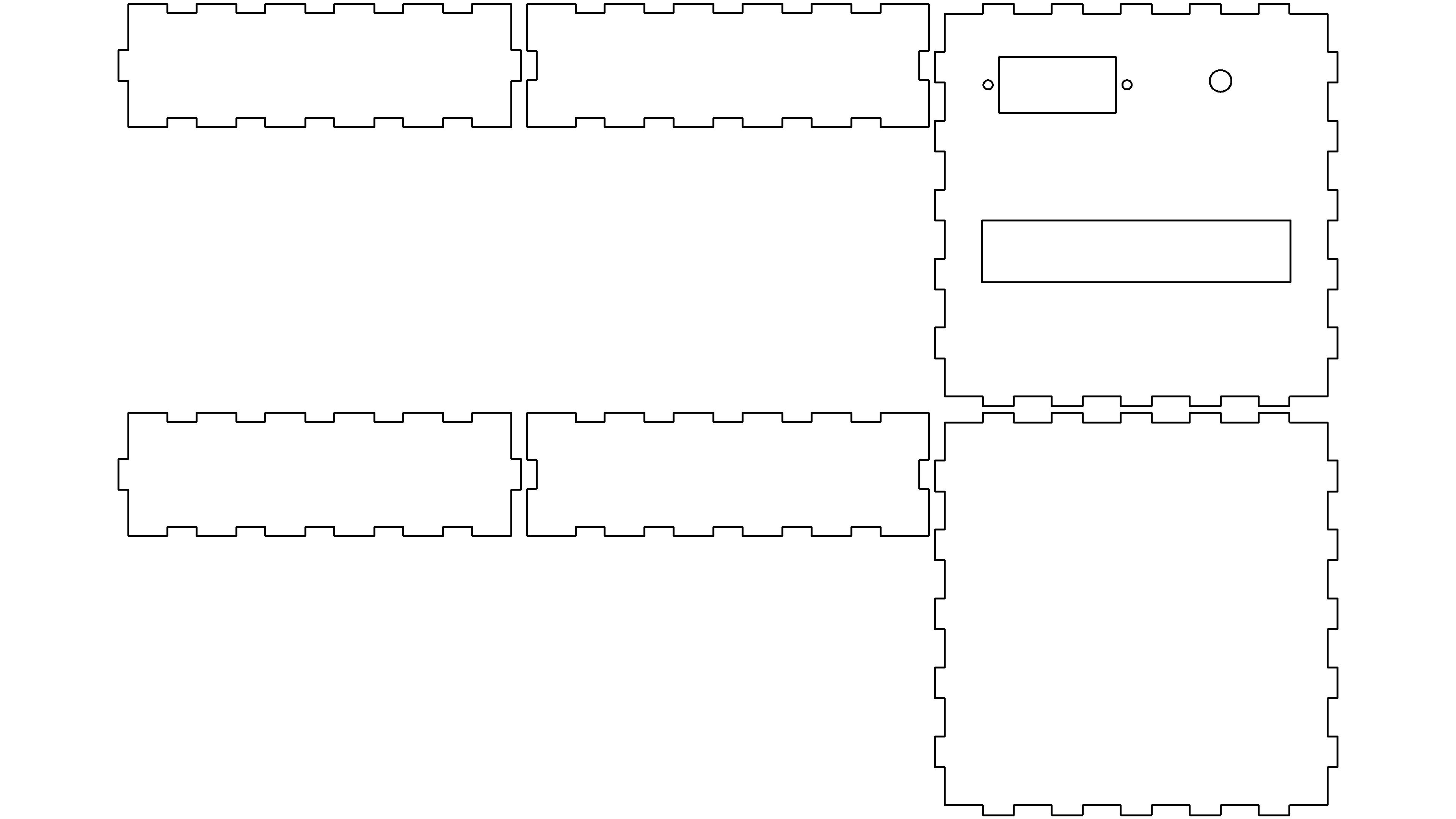
Work Introduction
The shell used in this work3mm acrylic sheet, through LaserMaker 2.0 Complete structural design and laser cutting processing, assemble into an integrated transparent display shell for easy observation of internal circuit structure. The work is a home ordering interactive device designed for visually impaired people, which does not require a screen and relies on physical braille buttons to complete operations. It is suitable for various home and offline scenarios.
The equipment master control adopts Arduino Uno, equipped with CI-03T Voice broadcasting module. Every time you press a button to select a dish, the system will voice broadcast the dish name and related information. The newly added diet recommendation logic in the work upgrade can make classified recommendations according to the dish attributes, such as automatically recommending low sugar dishes, avoiding high sugar heavy oil dishes, providing users with dietary restrictions such as hypertension and diabetes with a reference to order meals, helping visually impaired people complete the order independently without assistance from others, and improving their autonomy in life.
The shell structure adopts modular assembly design, and the acrylic sheet is slotted and positioned for easy disassembly and debugging of internal electronic components; The transparent shell can visually display the internal wiring and hardware layout, suitable for scientific and technological innovation learning and work display. The entire structure can be directly installed LaserMaker Export the cutting file for easy replication and secondary modification.
Bill of Materials
- 3mm Acrylic board (shell structural component, laser cutting)
- Arduino Uno main control board
- CI-03T Voice broadcasting module
- Button module (Braille physical buttons)
- Electronic accessories such as speakers and DuPont cables
Design highlights
- Structure:3mm Acrylic assembled shell, no glue for complex bonding, easy disassembly and assembly, transparent shell for intuitive display of internal hardware, suitable for scientific and technological innovation display.
- Function: Pure voice + Physical button interaction, no screen, suitable for visually impaired users; Add dish classification recommendations to meet the needs of healthy eating.
- Easy to use:LaserMaker Drawings can be directly edited for other enthusiasts to replicate and modify structural dimensions.
Instructions for Use
After power on, the device starts voice guidance, and the user presses the physical button with braille identification to browse and select dishes; The health recommendation mode can be switched, and the device automatically broadcasts suitable dishes, avoiding unsuitable dishes, and completing independent ordering (only order records, not including online order docking function).
related activities
This laser cutting design participated in the activity: Full Moon, Home and Country, Double Festival of Wisdom and Fun —— AIMid Autumn Festival and National Day Special Laser Creation Competition Event
Hello Teacher Zhong, may I ask if there is a video recording of your case? I want to show elementary school students how to learn. The main control board isunoBoard, the first thing we learned wasunoBoard, can you share the source code? Learn from it, I want to give them a chance to learn and upgrade2.0Change it - simulate a blind and deaf disabled person, touch Braille, and then press